BCPT 305 · Group 8
Consumerization of IT
Prepared byHamidreza Marashi · Mani Khayam · Niyasa Sachdeva · Guytano Ayrton
How employees’ technology choices change who can access company information, where copies are kept and what managers can oversee.

Employee choice at work
Consumerization of IT describes how tools and habits from everyday life shape the technology people use at work. Personal devices, hosted apps and AI can make it easier to work remotely and try new ways of doing a task. Those choices also affect who can see, copy or retain company information. Information systems (IS) managers have to decide where to allow choice and where the work requires stronger controls. [1]
- Bring your own device
- Using a personally owned device for work.
- Software as a service
- Using an application hosted by a service provider, usually over the internet.
- Shadow IT
- Using work technology outside the organization’s approval or oversight.
- Shadow AI
- Using AI tools for work outside the organization’s approval or oversight.
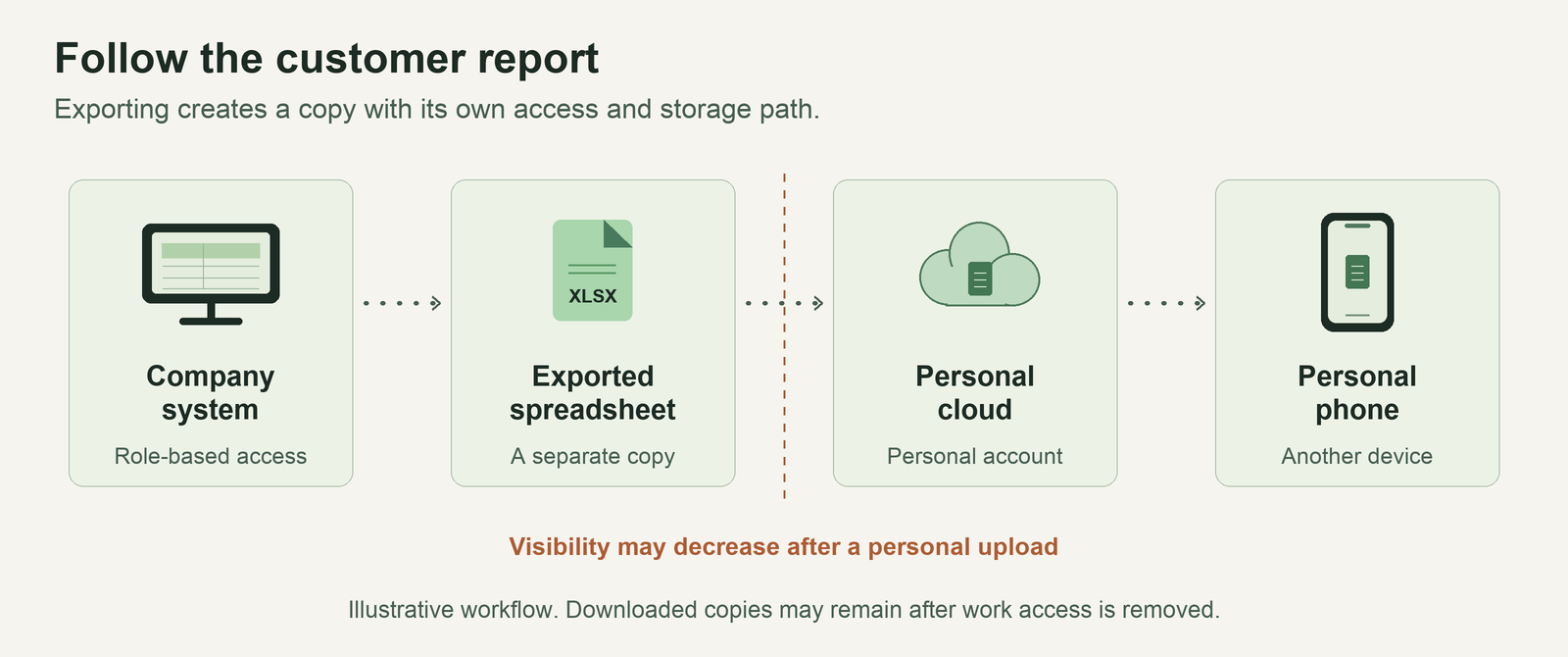
Consider the presentation’s fictional analyst. Their role lets them view a customer report in the company system. Exporting it creates a separate spreadsheet, and uploading it to a personal cloud service puts a copy outside the usual company workspace. If they use approved work storage instead, the company can review permissions and apply its sharing policies on supported services. Copies already downloaded still require separate follow-up.
How employee choice expanded
Shared computing gave organizations a central point of control. Desktops gave employees more room to choose how to work, and mobile devices extended that freedom beyond the office. Hosted apps and public AI tools made it easier to adopt a service before the company reviewed it. The dates below identify launches, documented workplace use and snapshots from surveys. Adoption varied by organization and role.
1960s–1970s Computing model
Mainframes and terminals
Time sharing let several people use a central computer through separate terminals. Employees worked within the software environment provided by the organization, which managed access and computing capacity centrally. [10]
1981 Product launch
The IBM PC reaches the desk
The IBM 5150 put personal computing within reach of more businesses. Employees could work with desktop software and local files. IT teams had to support a growing number of workstations and think about where files were stored and backed up. [11]
1989–1993 Technology milestones
The web and portable computing
The Web was proposed at CERN in 1989, IBM introduced the ThinkPad in 1992, and the Mosaic browser appeared in 1993. These developments made portable computing and access to networked information more practical. IT support increasingly included laptops, connections and browsers. [12] [13]
1999 Product launch
BlackBerry brings email into the pocket
Research In Motion introduced the BlackBerry 850, a two-way pager that let people handle email away from a workstation. Supporting work email now included managing portable devices and the connections they relied on. [14]
1999 and the 2000s Company milestone
Business software moves online
Salesforce dates its cloud-delivered customer relationship management business to 1999. As hosted applications became an option, teams could access some tools without a local installation. IT teams had to manage accounts and data held by outside providers. [15]
2007 Product announcement
The iPhone combines email, web and phone access
Apple introduced a consumer phone that brought these capabilities together. The product showed why employees might want the same device at work and at home. The announcement establishes what the phone offered at launch. [16]
2008 Product and workplace example
Consumer phones connect to work systems
Apple’s iPhone 2.0 announcement included work email integration, VPN and remote wipe. It also quoted Nike’s CIO describing iPhones already in use by employees. IT was able to offer company services on consumer devices using supported controls. [17]
2012–2013 Formal guidance
Personal devices become a management issue
ENISA documented consumer devices and apps entering organizations in 2012. NIST’s 2013 mobile guidance explicitly covered both company-provided and personally owned devices. Organizations had to decide which work data and services a personal device could access. [18] [19]
2015 Survey evidence
Shadow IT is hard to count
Nearly 72% of respondents to a sponsored Cloud Security Alliance survey said they did not know how many shadow IT apps their organizations used. The survey included more than 200 IT and security professionals. It illustrates why managers need ways to identify tools selected outside the usual approval process. [20]
2020 Survey evidence
Pandemic telework extends access beyond the office
In May and June, 33.3% of employed people age 16 and older in a U.S. survey reported teleworking because of the pandemic. The figure measures pandemic-related telework. It illustrates the pressure on IT to support remote connections across many working environments. [21]
2022 Public research preview
Public generative AI becomes easy to try
OpenAI released ChatGPT as a research preview in November. Employees could try drafting and other work tasks in a public service before their company had evaluated it. Managers now had to consider what employees could enter in an outside AI tool. [22]
2024–2025 Survey evidence
Employees bring their own AI tools
In Microsoft and LinkedIn’s 2024 survey of knowledge workers across 31 markets, 75% reported workplace AI use. Among AI users, 78% brought their own tools. A separate U.S. Pew survey found that 16% of workers said AI was used for at least some of their work. The studies asked different questions of different worker groups. [23] [24]
The spreadsheet in the presentation brings those changes together. The analyst can choose a familiar tool, work outside the office and keep a copy in a service the company may be unable to oversee. The management question is which of those choices the organization can support safely.
Cybersecurity and information risk
Start by tracing where information moves. A business can limit who reads a report at the source, restrict downloads for sensitive information and give employees a practical way to work remotely. On personal devices, explain what the organization supports, which information it can see and what it can remove. Some supported apps can keep work and personal data separate. [2]
Personal accounts, messaging and unapproved extensions can make it harder to track access and retrieve business records. IS and HR should coordinate when employees change roles or leave, while business owners check access to independent apps and supplier systems. AI introduces questions about what services collect or retain, who can retrieve it and how a person checks output before using it. [3] [4]
Uber and contractor access
In September 2022, Uber reported that a contractor’s password was likely exposed after malware infected a personal device. The contractor accepted a login approval request, and the attacker reached internal tools. As of the update, Uber reported no evidence of access to sensitive user databases. The case supports applying identity and device policies to contractors and limiting what each account can reach. [5]
Okta and personal browser profiles
Okta found that a support system credential was saved to an employee’s personal Google account through a browser profile on a managed laptop. It described compromise of the personal account or device as the most likely route of exposure. Okta disabled the affected service account and blocked personal Google profiles on managed work browsers. Device ownership alone leaves managers with decisions about which work accounts and profiles employees can use. [6]
U.S. securities firms and recordkeeping
In August 2024, the SEC announced that 26 firms agreed to pay US$392.75 million in combined civil penalties for failures to preserve required electronic communications. The SEC documented widespread use of unapproved communication methods. The case shows why an approved channel needs to fit the work and let the firm retrieve records when required. [7]
Business strategy and governance
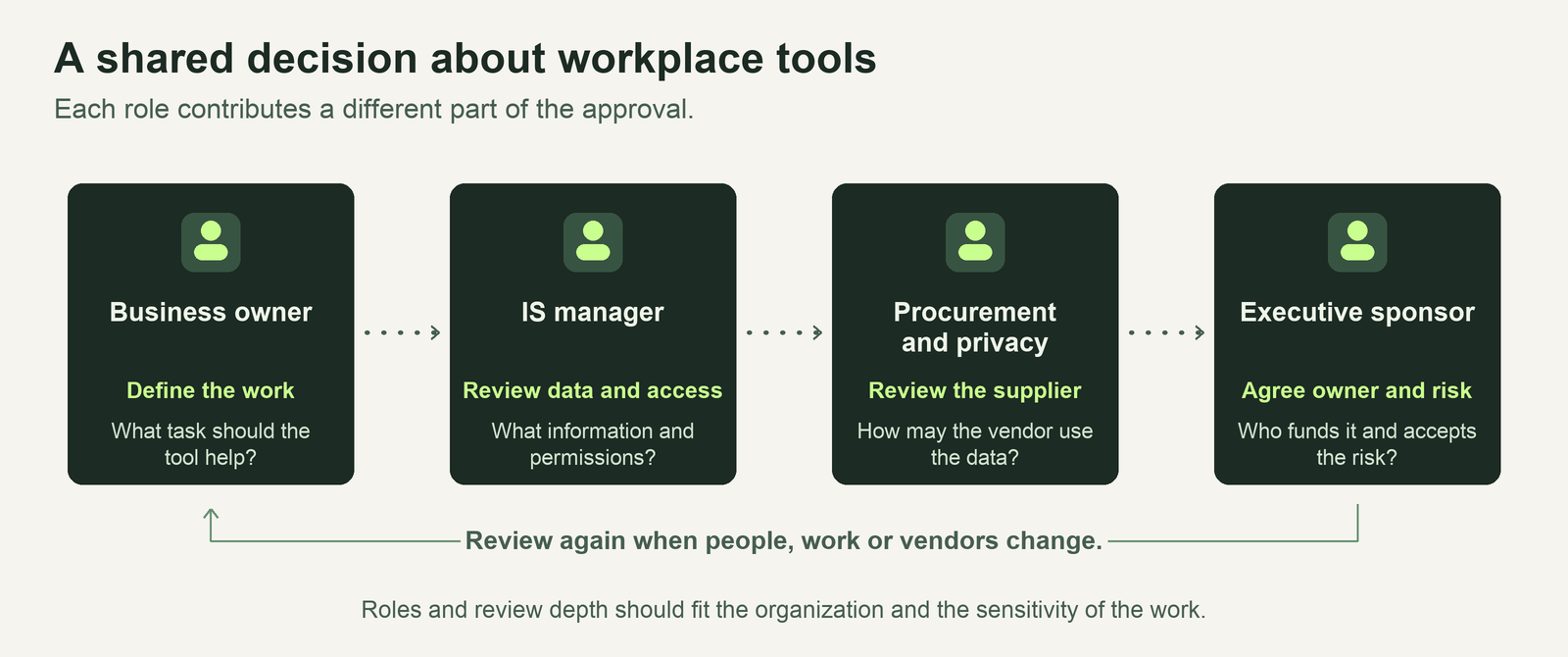
Business managers understand the workflow and can judge whether an approved tool meets employees’ needs. IS can set identity, device and data handling requirements. Procurement and legal or privacy staff can review vendors that receive sensitive information. Executives can approve the budget and decide how much remaining risk the business can accept. [1]
Four choices managers can make
- Decide who provides the device. Personal devices offer convenience and can reduce hardware purchases. Managed company devices give IT more control where staff handle sensitive information. App-level protections sit between those options. Microsoft Intune, for example, can remove organizational data from supported apps when app protection is configured. [2] [27]
- Provide an approved way to do the work. Use requests for consumer apps to identify which tasks approved tools make difficult. Give low-risk requests a short approval path. Compare an approved alternative on the task it needs to perform, its support burden and who can see the information.
- Limit supplier access and data use. Approve a vendor based on the information and permissions it needs. Use single sign-on and a documented process to remove access where integrations support it. Review what the vendor can retain, share and use for model training. Okta Workforce Identity describes features for sign-on, verification and access removal. Coverage depends on the applications and deployment. [28]
- Set rules for employee AI. Pilot an approved service on a defined task, set rules for which information can be entered and assign a person to review outputs. Tools such as Microsoft Purview can audit, warn about or block sensitive pastes on configured destinations in supported browsers. Pilot results can show where those controls and employee training need improvement. [4] [29]
Assign a business owner to each approved tool and review access when people change roles, the service changes or new data is introduced. Before ending a supplier relationship, decide how company records will be retrieved, transferred or removed and who will verify the result. This makes approval part of managing the tool throughout its use. [2] [4]
Evidence for the cost and risk trade-off
Verizon’s 2025 breach report counted third-party involvement in 30% of 7,956 breaches assessed for that measure, including cases involving software vulnerabilities. This is one reason to check how suppliers handle access and security. IBM’s 2025 study of 600 breached organizations reported that average breach costs were about US$670,000 higher for organizations with high levels of shadow AI than for those with low levels or none. The IBM-sponsored study compared observed cases, so the difference is an association. [25] [26]
How two companies responded
Google’s BeyondCorp shifted access decisions toward verification of the user and device. The approach supported location flexibility while tying access rules to company resources. JPMorganChase took a different approach to providing employee choice by rolling out an approved generative AI platform for tasks such as drafting and idea generation. The bank reported onboarding 200,000 users within eight months. That figure measures rollout scale. Managers can examine value through the quality of drafts, time saved and review effort. [8] [9]
Budget for support, licensing, integration and training alongside hardware. For a pilot, choose a workflow with a clear business goal, then measure turnaround time, quality and support effort before and after. Account for whether older systems can support the controls and how workers feel about managing work data on their personal devices. [2] [8]
Future use and adoption barriers
We expect employee-led adoption to continue as public AI tools and hosted apps make new capabilities easy to try. How widely an organization can support that use will depend on its existing systems, the information involved and its capacity to train and support employees. The Microsoft and LinkedIn findings show employee initiative at one point in time. Managers should use their own workflow evidence to decide where adoption creates value. [23]
Older applications may be difficult to connect to common access rules. Licensing, integration and support costs can limit a wider rollout, while controls on personal devices can raise employee privacy concerns. Start with a defined task, explain what the organization can see and remove, and check both the business result and the effort needed to maintain safeguards before expanding. [2] [4]
Recommendations
- Pilot an approved AI tool in one workflow. Assign a business owner, agree which information can be entered and decide who reviews output. Measure task time, quality and review effort before expanding the pilot.
- Match device policies to the role. Offer supported work apps on personal devices where the controls fit. Use company-managed devices where the work calls for stronger safeguards. Track how quickly access is removed when people change roles or leave.
- Give employees a clear path to request tools. Publish the approved options and make routine requests easy to review. Assign a business owner to each new tool and look more closely at vendors that receive sensitive data or connect to company systems.
Sources
- Gregory et al. (2018). IT Consumerization and the Transformation of IT Governance. MIS Quarterly.
- Howell et al. (2023). Guidelines for Managing the Security of Mobile Devices in the Enterprise. NIST.
- Rose et al. (2020). Zero Trust Architecture. NIST.
- Autio et al. (2024). Generative Artificial Intelligence Profile. NIST.
- Uber (2022, September). Security Update.
- Bradbury (2023, November). Support Case Management System Incident Report. Okta.
- U.S. Securities and Exchange Commission (2024, August). Recordkeeping Enforcement Release.
- Ward and Beyer (2014). BeyondCorp: A New Approach to Enterprise Security.
- JPMorgan Chase & Co. (2025, June). LLM Suite Rollout.
- Computer History Museum. Timeline of Computer History: 1961.
- IBM. The IBM PC.
- CERN. A Short History of the Web.
- IBM. ThinkPad.
- Ingenium. RIM 850 Wireless Handheld Collection Record.
- Salesforce. Our Story.
- Apple (2007, January). Apple Reinvents the Phone with iPhone.
- Apple (2008, March). Apple Announces iPhone 2.0 Software Beta.
- European Union Agency for Cybersecurity (2012). Consumerization of IT: Top Risks and Opportunities.
- Souppaya and Scarfone (2013). Guidelines for Managing the Security of Mobile Devices in the Enterprise. NIST SP 800-124 Rev. 1, historical revision.
- Cloud Security Alliance (2015). Cloud Adoption, Practices and Priorities Survey Announcement.
- Dey et al. (2021). Teleworking and Lost Work During the Pandemic. U.S. Bureau of Labor Statistics, Table 1.
- OpenAI (2022, November). Introducing ChatGPT.
- Microsoft and LinkedIn (2024). 2024 Work Trend Index Annual Report.
- Lin and Parker (2025). Workers’ Exposure to AI. Pew Research Center.
- Verizon (2025). 2025 Data Breach Investigations Report, Figure 7.
- IBM (2025, July). 2025 Cost of a Data Breach Report Findings.
- Microsoft. How to Wipe Only Corporate Data From Intune-Managed Apps.
- Okta. Workforce Identity Product Documentation.
- Microsoft. Restricting Paste Actions Into Browsers.
- Group 8. (2026, November 22). Work information across devices [AI-generated editorial illustration]. Created using OpenAI image generation.
Image generation prompt
Create one wide cinematic editorial cover photograph for a university report about consumerization of IT, cybersecurity and business management. Landscape 16:9 composition, no words, no typography, no logos, no padlock or shield symbols. A sophisticated real modern office desktop in soft natural evening light, dark forest-green and warm cream palette. A monitor showing an abstract spreadsheet with faint illegible grid cells sits on the left, a slim laptop is centered, and a personal smartphone on a desk at right. A restrained visual overlay made of luminous soft pale-green points and thin flowing light traces connects a single small document shape on the monitor across to the phone, communicating how work information moves between devices. The physical technology looks realistic and premium, with matte materials, thoughtful shadows, subtly grainy editorial photography, elegant gallery-quality depth, high visual clarity. No people, no hacker hoodies, no neon sci-fi room, no warning banners. Compose broad horizontal scene suitable for the hero of a serious school report, with calm negative space in the upper third and detailed devices visible in lower two thirds. Generate as one polished image.